Enroll personal iOS devices
Related Video: Enrolling a Device: iOS
To enroll a personal iOS device:
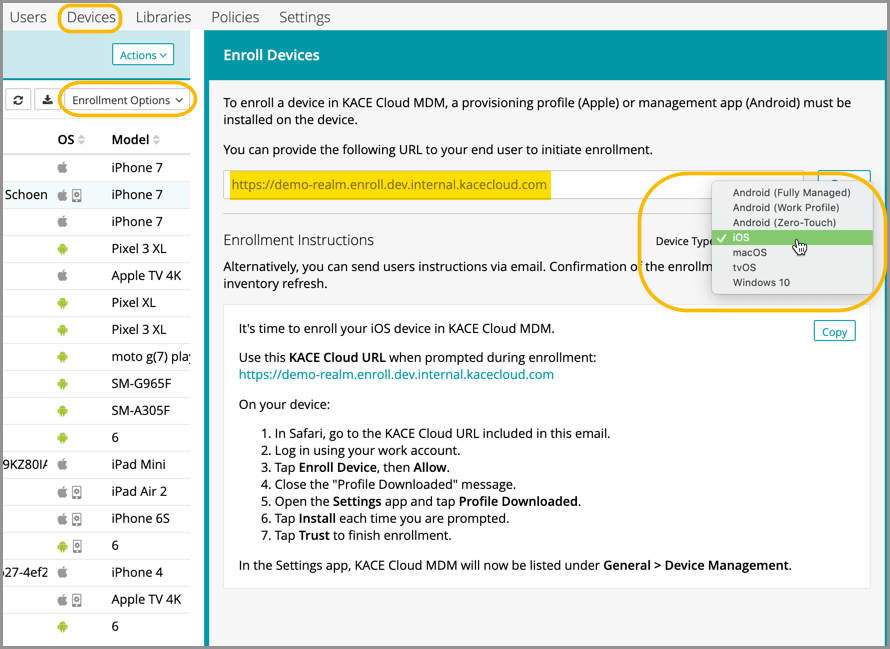
- Select the Devices tab in top navigation.
- Click Enrollment Options and choose Enroll Devices.
- In the Enroll Devices view that appears on the right, click Device Type and select iOS.
Administrators can provide the provided enrollment URL to the device user to initiate enrollment, or send the URL with instructions by email. The administrator can assemble the enrollment URL using the following syntax:
- https://yoursubdomain.enroll.kacecloud.com
- https://yoursubdomain.enroll.westeurope.kacecloud.com (westeuropedata centers only.)
During the enrollment process, a provisioning profile is installed on the target iOS device.
iOS devices can also be enrolled using the Apple Device Enrollment Program. See About the Apple Device Enrollment Program
